Home Lab

In this post, I will be discuss my home network that I have recently set up at my house.
Published on March 27, 2025 by Alexander Woods
for fun networking learning
4 min READ
Overview
Recently I have wanted to use an old unused gaming laptop for a more useful purpose than sitting and collecting dust. I have also developed an interest in networking, but did not know where to start. To figure out what to do, I asked a friend who took networking at college and graduated about a year ago for some help and he guided me through the process over the course of two days.
Proxmox
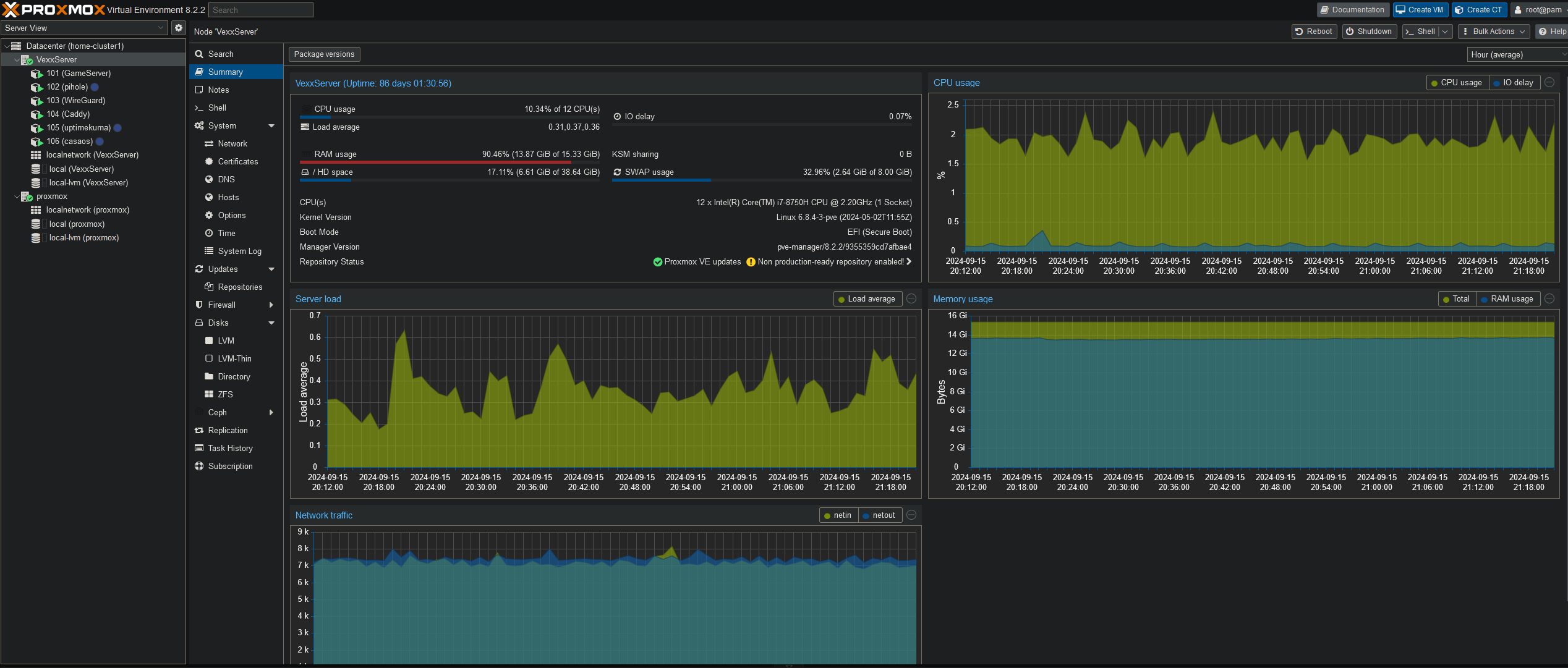
To start he recomended I put Proxmox onto the laptop to be a hypervisor with a web interface to manage any services I would like to include on the system.
Later another friend of mine gave me an old Dell PowerEdge R330 that had been mostly gutted besides the RAID care and 8GB of ram. I put in eight 2.5” 1TB SAS drives and configured them to RAID 6 instead of 10 because I an not very concerned with the drives failing, as they are only 1 TB drives. I will use RAID 10 when I upgrade the lab with more ram and much more disk space.
Check out the current state of my Proxmox
Wire Guard
Wireguard is a simply vpn that I use to remote into my server from anywhere, and thus was the first thing I set up. I generated config files for both my desktop and my phone to check on my server remotely. This is especially helpful as I left the server home while I brought my desktop to college, allowing me to remotely edit
Caddy
Caddy is used as a reverse proxy. Caddy routes the traffic through cloudflair to get HTTPS certificates, and also through Pi-Hole to route the ip addresses through my domain locally.
Though caddy can be use host a web server, I think I would add a new service specifically for a web server
Pi-Hole
I use Pi-Hole for two main purposes, as a network level adblocker and, more importantly, the DNS server. This works together with Caddy and Cloudflare to route services through my domain.
The graphs on blocked and allowed traffic, as well as the traffic type is really cool to see. I am definetly a person who loves seeing beautiful data, which is why I set up a Grafana service in CasaOS (that I will describe later!)
AMP
AMP stands for Application Management Panel. It is a game server that can be used to make self hosted servers on the network. It works as a manager for the servers, including presenting them in a web interface, editing files, automatic updates, and many other useful features for game servers.
I use it to run minecraft servers for friends currently, but I plan to add new servers as we want to play different games together like factorio and whatnot.
It is one of the few things that are exposed to the internet on the server. exposed to the internet using cloudflare and my domain
3D Printer
I have an Ender 3 V3 KE 3D Printer that I access via the web interface to request print operations. There is an issue however, there is no authentication of any kind on said web interface. Anyone who connected to the network could do whatever they wanted to the printer. This is especially an issue at college where anyone in the building could mess with my printer. I went about fixing this in two steps.
Firstly, I added my printer to the reverse proxy so you can access it through my domain. Going through this domain makes you use a feature of Caddy which is called basic auth, it is a simple authentication program as the name implies. Now if you try to access the 3d printer through the domain you are required to log in. That is all well and good, but you can still access the printer through its ip and bypass caddy entirely. This is where the second step comes in.
The second step involved editing the files on the printer itself. The printer has nginx built into it, so I simply went into its config and added an ACL so the only permitted request was from the Caddy ip address. Now trying to access the printer through any means other than through the domain is forbidden outright, and going through the domain prompts you for a log in to access.
Casa OS
I use CasaOS to host a Grafana dashboard, getting its data from zebbix. It is currently quite lacking as the original server I was using was running low on resources. It is basically a docker playground in a LXM container (containerception).
Grafana gives beautiful graphs on traffic, resources, services, etc. It is a fantastic dashboard tool for visualizing issues or to just admire.
Next steps
Im working on setting up Swag and Croudsec to protect my server. I also plan to move in pihole and use swag to route through my domain. I also recently updated my Poweredge r330 to 64GB of ram, which will let me run alot of new services.